Bubble Sort
This content is for DSA. Switch to the latest version for up-to-date documentation.
Bubble sort is a simple sorting algorithm that repeatedly steps through the list, compares adjacent elements, and swaps them if they are in the wrong order. The process is repeated until the list is sorted. It’s called “bubble” sort because larger elements “bubble” to the top of the list.
Properties
Section titled “Properties”- Comparison-based: Works by comparing adjacent elements
- In-place sorting: Sorts the array without using extra space
- Stable algorithm: Maintains relative order of equal elements
- Simple implementation: Easy to understand and implement
How it Works
Section titled “How it Works”- Start from beginning: Begin with the first element of the array
- Compare adjacent elements: Compare current element with the next element
- Swap if needed: If current element is greater than next, swap them
- Move to next pair: Continue comparing adjacent pairs through the array
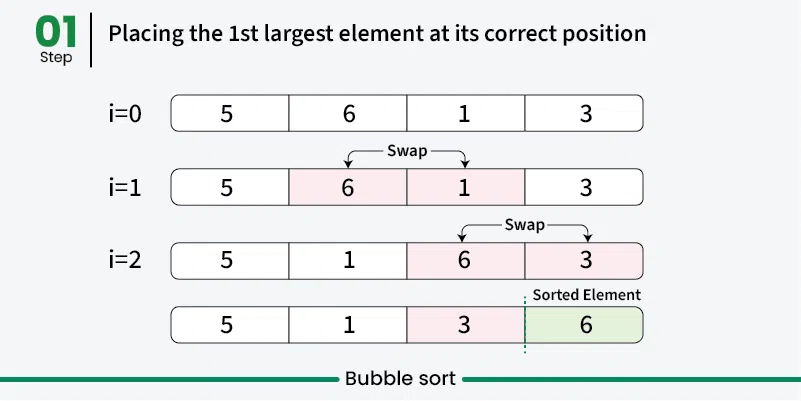
- Complete one pass: After one complete pass, the largest element is in its correct position
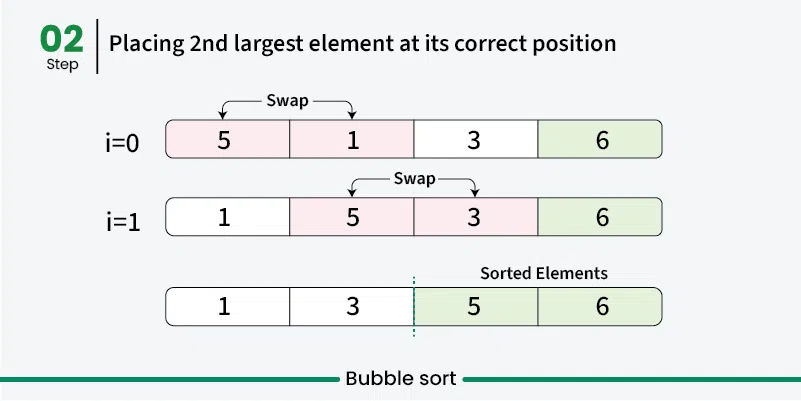
- Repeat: Repeat the process for remaining unsorted elements
- Optimization: In each pass, ignore the last sorted elements
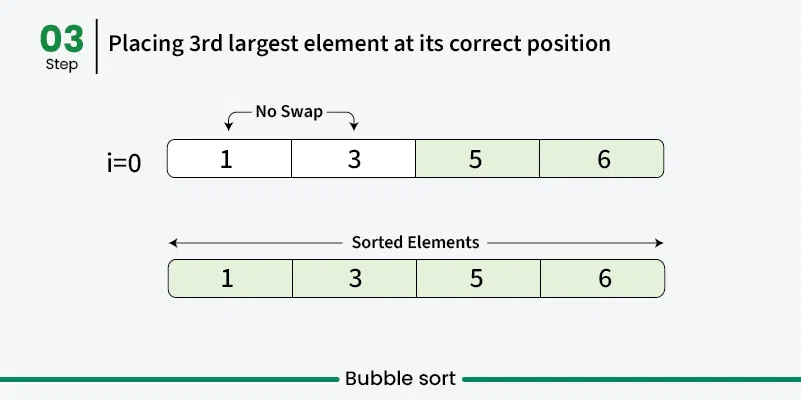
- Done: Continue until no swaps are needed
Use Cases
Section titled “Use Cases”- Educational purposes: Great for learning sorting concepts
- Small datasets: Acceptable performance for very small arrays
- Nearly sorted data: Performs better when data is already mostly sorted
- Simple implementation needed: When code simplicity is more important than efficiency
Time Complexity
Section titled “Time Complexity”- Best case: O(n) - When array is already sorted (with optimization)
- Average case: O(n²) - Random order of elements
- Worst case: O(n²) - When array is reverse sorted
Space Complexity
Section titled “Space Complexity”- O(1): Constant space, only uses a few variables for swapping
Advantages
Section titled “Advantages”- Simple to understand: Very intuitive algorithm
- In-place sorting: Doesn’t require additional memory
- Stable: Maintains relative order of equal elements
- Adaptive: Can be optimized to detect if array is already sorted
Disadvantages
Section titled “Disadvantages”- Poor performance: O(n²) time complexity makes it inefficient for large datasets
- Too many comparisons: Even for small improvements, requires many comparisons
- Not practical: Rarely used in real-world applications due to poor performance
Example
Section titled “Example”public class BubbleSort { // Bubble sort (stops early if array becomes sorted) public static void bubbleSort(int[] array) { boolean swapped;
// 📌 Part 1: Outer loop for number of passes for (int i = 0; i < array.length - 1; i++) { swapped = false;
// 📌 Part 2: Inner loop for comparing adjacent elements // Reduce the range in each pass since largest elements bubble up for (int j = 0; j < array.length - i - 1; j++) {
// 📌 Part 3: Compare adjacent elements if (array[j] > array[j + 1]) {
// 📌 Part 4: Swap elements int temp = array[j]; array[j] = array[j + 1]; array[j + 1] = temp;
// Mark that a swap occurred swapped = true;
}
}
// If no swapping occurred, array is sorted if (!swapped) { break; }
}
}
public static void main(String[] args) { int[] numbers = {64, 34, 25, 12, 22, 11, 90};
System.out.print("Original: "); for (int num : numbers) { System.out.print(num + " "); }
bubbleSort(numbers); System.out.println();
System.out.print("Sorted: "); for (int num : numbers) { System.out.print(num + " "); } }}Visualization
Section titled “Visualization”